Common Errors
Some common errors you may encounter during installation.
npm install hangs on forever
Solution from: "npm install" hangs on sill: idealTree build
On Ubuntu 22.10, disabling IPv6 fixed this:
$ sudo sysctl -w net.ipv6.conf.all.disable_ipv6=1
$ sudo sysctl -w net.ipv6.conf.default.disable_ipv6=1
To do this permanently, edit /etc/default/grub, change:
GRUB_CMDLINE_LINUX_DEFAULT="quiet splash"
to:
GRUB_CMDLINE_LINUX_DEFAULT="quiet splash ipv6.disable_ipv6=1"
and then run:
$ sudo update-grub
Error related to Timezone
Solution from: DMOJ Documentations
Execute this command after initializing database:
$ mariadb-tzinfo-to-sql /usr/share/zoneinfo | sudo mariadb -u root mysql
Module Not Found: pkg_resources
ModuleNotFoundError: No module named 'pkg_resources'
Context: After the make_style.sh process, you have to execute the command ./manage.py collectstatic, and it appears this error.
Solution from: No module named pkg_resources
Just install setuptools module:
(vnojsite) $ pip install setuptools
Users can’t register to the main site
Context: You are the user who is trying to register an account, and this appears:
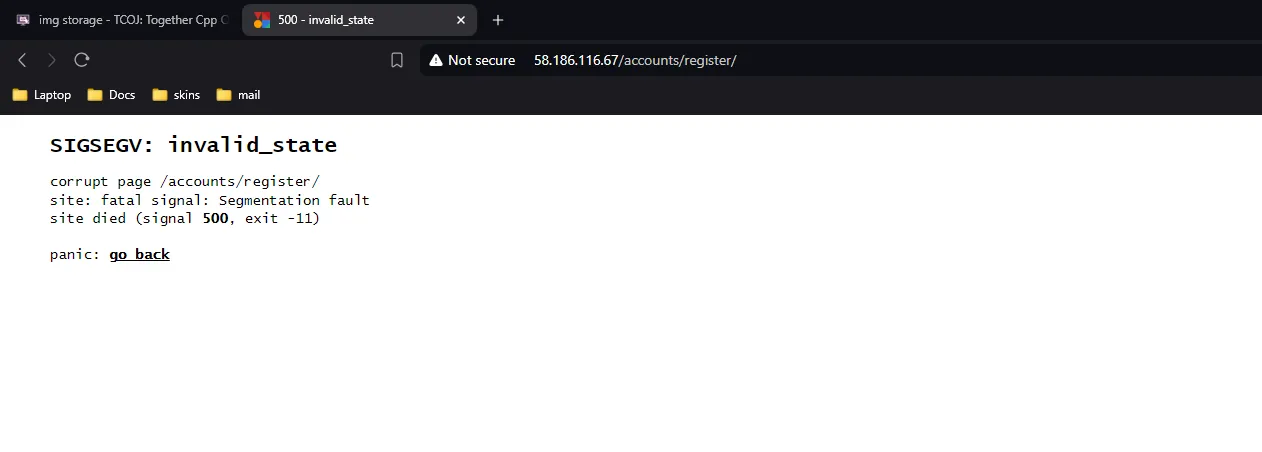 Solution from: Giaosus
Change/Add this line into your dmoj/local_settings.py or dmoj/settings.py, depending on your implementations:
SEND_ACTIVATION_EMAIL = False
site.conf gets on FATAL
The error which you encountered probably is:
open("/tmp/dmoj-site.pid"): Permission denied [core/utils.c line 3602]
Easy solution, change the permissions of /tmp folder:
$ chmod 755 /tmp -R
celery and bridged STARTING then RUNNING then STARTING, again and again and again and again
ImportError: cannot import name 'WebSocketException' from 'websocket' (unknown location)
Solution:
$ pip install websocket-client
403 Forbidden (Nginx)
Context: Most of the static files are unable to be picked up. Solution:
Nginx need to have +x access on all directories leading to the site's root directory.
Ensure you have +x on all of the directories in the path leading to the site's root. For example, if the site root is /home/username/siteroot:
$ chmod +x /home/
$ chmod +x /home/username
$ chmod +x /home/username/siteroot
413 Request Entity Too Large (Nginx)
Context: As the title has said.
Solution: Add this line into your nginx.conf file:
client_max_body_size 1G;
Docker not found
Solution:
$ sudo apt install docker.io
The problem status does not update
Solution from: https://github.com/DMOJ/online-judge/issues/816
Probably you are using the default cache backend settings.
You should be using redis or memcached instead of LocMemCache. I recommend memcached, it is very easy to set up.
Install instructions from: https://medium.com/@netfluff/memcached-for-django-ecedcb74a06d (medium.com is being banned in Vietnam, consider using a VPN)
(vnojsite) $ pip install python-memcached==1.59
$ sudo apt-get install memcached

[OPTIONAL] $ memcached -vv

$ sudo service memcached start
DJANGO setup:
CACHES = {
    'default': {
        'BACKEND': 'django.core.cache.backends.memcached.MemcachedCache',
        'LOCATION': '127.0.0.1:11211'
    }
}
Sub-problem: Cannot start memcached
Solution from: https://stackoverflow.com/questions/60250885/cannot-start-memcached
Have a look into /etc/memcached.conf, there might be written something like:
-l xxx.xx.xx.xx
-l ::1
If you are trying to connect via localhost: just comment the line.
If you are trying to connect from somewhere else check the IP for correctness.
Sub-problem: 'Client' object has no attribute '_deletetouch' in django admin logout section
Solution from: https://stackoverflow.com/questions/63394004/client-object-has-no-attribute-deletetouch-in-django-admin-logout-section
In case anyone got stock in this again, I've tested recent versions of python-memcached, found recently updated versions, which is 1.60 and 1.61 would cause this. So I rolled back to 1.59 and solve the problem. (this solution has been included in aforementioned instructions)